Saturday, July 2, 2016

Happy July 4th!


Happy 4th of July to our creative friends! I hope you all have a wonderful weekend with good food and lots of fun with family and friends.

There are a few things happening this weekend at Sher's Creative Space! Actually, there is so much going on behind the scenes these days my head is spinning! It's going to be a creative summer.

First, I want to introduce another new feature.
I've added a comment section at the bottom of the home page. I'd love for you to go over and leave a comment. Let me know if there is anything you'd like to see in the future, or just share your experience shopping with Sher's Creative Space so others will know they can shop with confidence.

Second, I'm introducing this week's Crazy Deal!
Since it's summertime, I thought it would be fun to make the special something summery, so I've put my Vacation Applique Template Bundle on special for $2.50. That's all six applique templates for less than you would pay for my duos!

Thirdly, a 4th of July special!
If you use coupon code USA2016 you will save 20% storewide on July 2nd through July 4th. I just love a good sale!

Looking into the future...
We'll be celebrating Christmas in July after we all recover from the 4th. We'll have Christmas related articles, tips, and specials.

There are so many fun things I'm planning. I just wish I had more time. Look for more tutorials, tips, sales, and fun on the blog and at the website. 

Friday, June 24, 2016

Something NEW!


Now that I have my own website and have 100% control, I can have my crazy sales and deals! I've decided to have a weekly special with a price that is so very low, it's crazy!

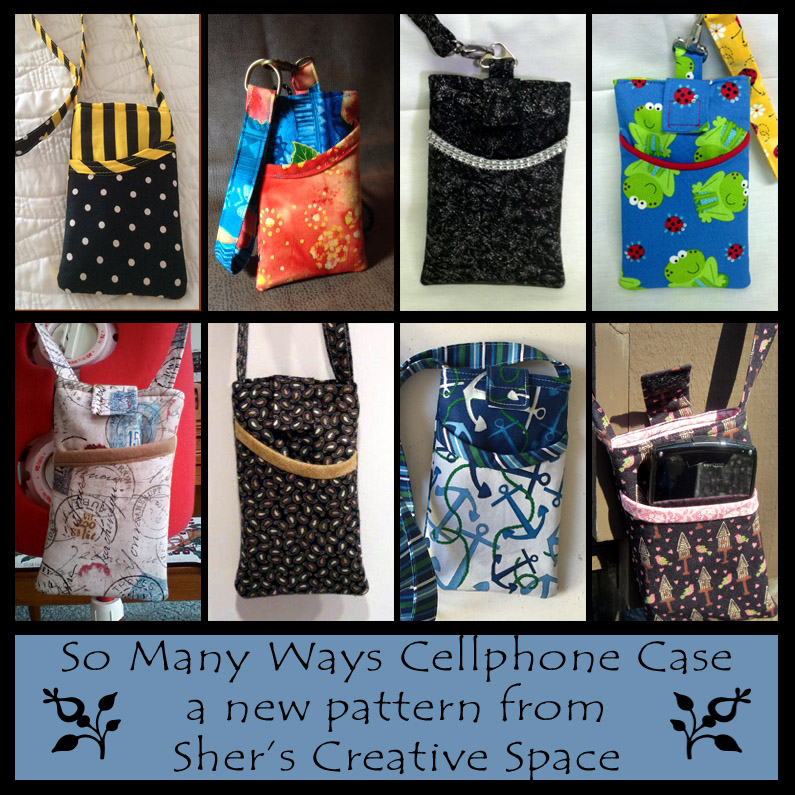
We'll begin with my So Many Ways Cellphone Case. It is normally priced at $4.95, but this week it will be $2.50. 

With July around the corner, I'll be concentrating my efforts on Christmas in July, my weekly specials will be all Christmas related! Stay tuned.

To take advantage of this one, click HERE!

Thursday, June 16, 2016

The Corset Purse - Thank You to my Awesome Testers!


Once again my testers have been busy helping me finish up my newest pattern. These ladies were so kind as to give up their time to try out my Corset Purse, give me their suggestions, and catch my mistakes. I'd be lost without them! They all did such a beautiful job, you just have to see for yourself.

Vita chose this beautiful paisley swirl print. I'm not sure if that's what it is, but that's what I'm calling it. I might also add that it's in my favorite colors and she sure did give this bag a touch of elegance. 


Kalynn went with this cute and colorful flower print against the blue. It looks like she did some fussy cutting to get those flowers exactly where she wanted them. Great job!


Dotty made these colorful bags up for her granddaughters and I'm sure they loved them! That is some super colorful fabric and as much as I tried to decide which one I liked best, I couldn't. Love them both!


Many of my readers probably remember Maxine from my previous testings. This is the third bag she has tested for me and as always, she didn't disappoint. She paired this cute sewing themed fabric with this beige pearl vinyl. Love it! She also said that she made the bottom a little bit bigger by the way she boxed the corners (explained in the pattern), and you can see that it gave it a little different shape. I'm definitely going to try that on my next one.

So thank you, thank you, thank you! You all did a beautiful job.

If you want to make a Corset purse for yourself, you can find it at my website HERE. If you hurry, you'll still be able to take advantage of my grand opening special by using coupon code GRANDOPENING to get 20% Off store-wide!

This offer is only good at my website Sher's Creative Space, and will not work at my other online shops.

Sunday, June 12, 2016

Beat the Heat!


How can you beat the heat and keep cool? Stay inside with the air conditioning and stitch. It's never to early to make Christmas gifts.

Thursday, June 9, 2016

My New Website's Grand Opening!


My new website is ready! I've been working typing my fingers to the bone for days and days! 

Stop by Sher's Creative Space and check it out! I'd love to hear what you think.


From now until June 12th you can get 20% OFF store-wide.

Just don't forget to use coupon code
GRANDOPENING
at checkout.

Tuesday, May 31, 2016

Travel Bags - More to My Addiction!


Anyone who knows me can tell you that I have a big problem with addiction. OK, not the mind altering addiction, but a purse addiction. I always have and I always will. I have other addictions as well, such as candles, chocolate, and sewing. But we'll get to those another time. Right now it's my purse addiction. I'm not asking for help or an intervention, just sharing a little part of it because it's become even more fun than it used to!

Now that I've delved into purse designing, I already have a couple purse patterns published, one being tested right now by my incredible pattern testers. I also have another in the beginning stages. Now that I'm making them, I've come to the conclusion that I need purses for various occasions. Lately I've been carrying the tiny bags such as The Paige Bag that holds my cellphone and a few necessities. I just hate lugging around a big bag. It seems like when I do, I don't use 99% of the stuff in there anyway. So time to pare down. 

Above you will see three fabrics that I have purchased online at fabric.com. They are all travel inspired. I couldn't decide between them so I bought them all. I want to make a fun little purse (a mini of course) for when I'm on the go. The hubster and I love to travel, especially for long weekends. I've finally decided how I'm going to use all those fabrics. The USA Road Trip fabric (center) will be used for the three week road trip the hubster and I will be taking as celebration for his retirement which will happen in the next six months to two years. He hasn't decided yet. It's going to be hard not to use that cute fabric before that time comes. I might have to buy more.

The map fabric (right) will be made for my next trip to visit my daughter in October. 

The stamps (left), I just love so I'm going to make an everyday bag carry this summer. I do have a lot more travel themed fabric (maybe another addiction) but these are already planned for something. So am I in over my head?

A little history. I designed my first purse when I was about fifteen years old. I remember it well and I wish I had a picture of it. Maybe someday I'll find one when I dig through the 25,000 pictures my mom has in boxes. I was so proud of that purse! I wish I still had it because it would fun to see how far my skills have come some fifty years later. I didn't have a budget, because I didn't have a job, so I used leftover fabric from mom and my projects from my Home Economics Sewing Class. Anyway, I'm in the process of remaking that pattern right now. It's quite a ways from being released but I'm really having so much fun with it but this time, I'm taking it to a whole new level!

Saturday, May 21, 2016

Viewing, Using, and Printing PDF Patterns


PDF patterns are becoming more and more popular everyday! Yes, everyday. There are numerous reasons for this such as:

Instant gratification When you see a pattern you like, you can purchase it and get started on making the project immediately.

Everyone can open them No matter what computer or mobile device you have, everyone can use the PDF which is actually a Portable Document Format file. It's pretty standard and the reader is free.

Price PDF patterns are often a little less expensive than printed patterns. There are no printing costs which can keep the cost down for the designer.

Easy to read You can easily read the pattern on your computer or mobile device and print only the pages that you need.

Huge selection You have pretty much an unlimited supply to make anything you need right at your fingertips, literally!

Supporting your independent designers Most PDF pattern makers are not sitting behind a desk delegating. No way! These designers are working in their studios for hours and hours on end to get the pattern from the image in their mind to the digital copy you receive. There is a lot more work put into designing digital patterns than most people realize. By supporting these small business owners, you are keeping their creative flow going, and contributing to a business that they are personally proud of. 

For those who are unsure to to read or print a PDF patterns, I'm going to guide you along the way. As a designer I do get questions on this subject, as well as seeing it brought up elsewhere.

First and foremost, every designer I know recommends you open, read, and print your files from the Adobe Acrobat Reader. If you don't have it, you can download it free from the ADOBE WEBSITE. If you are using your mobile device (cellphone, tablet, etc) you can download the Adobe Acrobat Reader app.

Why Adobe? Because it's the best! Also, it's completely stable, it's free, it's the most popular reader, it's user friendly, and a million other reasons. It's also a program that the designers are familiar with and are best able to help you if you run into a snag. There are so many readers out there, and I'm sure many of them are very good, and if it works for you, great, use it. If it doesn't, switch to Adobe where we can better assist you.

I personally like to read and print my patterns from my laptop, although I've used my mobile devices in the past as well. On my desktop version, you can see at the left, you get little images of the pages. This is so helpful when you are trying to find something.


What I like best is that if you want to remember something that you will need to refer back to, you can easily "highlight" that area so it will stand out from the rest of the pattern. It's so simple too. Just click on that little highlighter icon at the top of the screen, then drag your cursor over the are you want to highlight. Simple! You can also do this on your mobile devices by clicking on your menu at the bottom and it will bring up your little highlighter.


Many of you are probably already familiar with the bookmarking. Just click the little bookmark item at the top, and you can bring that page up anytime you want! You'll find it at the top on the mobile devices and the upper left on the desktop version.


Another thing you will find super handy is the "notes" feature. You will see a little icon that resembles one of those speaking clouds you see on cartoons. Inside that will be little lines. You click on that then it will ask you to tap on an area you want to leave a note. It brings up a little sticky note type thing and you make your notation there. This is especially handy if you want to change the size of something, or you don't want to forget where you purchased your supplies. After you write your note and close it, you will always see that little icon there so you can click on it and see what the note is telling you. Just be sure to save your changes to the document if you want to use that pattern again. If you don't want to save the changes, don't, and your pattern will be exactly the way you started. This is also available on the mobile devices too. How many of us have written all over our paper patterns? I do all the time. This way, you are doing the same thing but on your digital pattern. Love this feature more than I thought I would.


There are so many other things you can do with this reader, but that's an entire lesson so those were the basics for reading and making your patterns work best for you. I personally plan to play with the program more so I can find other things to do with it.

OK, you now know the basics. One of the most important things to know is how to print your pattern. If you want your pattern to turn out perfect, it must be printed out at 100% actual size. This will be found in your printer settings.

When your print box appears, you will have that option. Not all readers make it this easy for you and that's another reason why we all like Adobe. You will notice you have the option to print at Actual Size. You will also see a Custom Scale where my box says 100%. If you want a bigger item, you can choose a bigger percent, if you want a smaller item, you can choose a smaller percent. This is best handy when you are printing out things such as appliques. Many of the applique templates I sell are changed by the customer this way. If they want to add an applique to a baby bib or candle cozy, they certainly don't need the 7 inch size I have provided. For most patterns, you will print it out at 100%.


Some patterns you might want to enlarge or reduce most of the pieces while others will be printed out at 100% such as wrist straps, connector tabs, zipper ends, etc. Those need to remain the size they were designed at while the other pattern pieces can be adjusted by changing the percent of your printout.

The next most important thing you need to know about printing a pattern is which pages you want to print. I don't like to print the instructions because it's a waste of paper and ink. I print out the pattern pages I need and the list of dimensions if there are any. So I just put those pages into the box for printing. On my mobile app, I check or un-check the pages. Obviously, the pages I'm printing will be left checked.


Also remember that you will need to make sure your page orientation matches, and in most cases this is set to automatic so they do. This means if your pattern is being read in portrait style, make sure it prints this way.


On many patterns you will have to piece together a couple or more pieces. This is because your printer only prints out so big and your pattern piece will not fit on one page. The pattern designer will show you what to tape to, and where to tape it. On my patterns I have a little image that looks like scotch tape that tell you exactly where to tape your pieces. Super simple!


Basically that's it! If you are unfamiliar with reading, using, and printing your patterns, I hope this article was a big help to you.

The pattern I've been using for a reference is the So Many Ways Cellphone Case which is available at Etsy and Craftsy.

Here is one more final tip; if you go into the advanced computer settings you can choose to print in DRAFT mode. This is where your computer will print while using the least amount of ink possible to do the job. I used to do this but now I use the HP Instant Ink Program where I'm charged by the amount of pages I print instead of the amount of ink I use. I suppose that is a tip in itself and well worth it if you have an HP printer. I save a fortune on ink! Just printing out my photos used to cost a fortune, but no more!

Wednesday, March 23, 2016

New Applique Shop Now Open

Since my applique templates are so popular, I decided to open a shop for just them. This new shop is at the Meylah Marketplace. If you stop by, you can use the coupon code NOWOPEN to get 20% off through this weekend only. I have a huge selection and I'm adding more!

Follow this link to my new shop:

Sher's PDF Applique Templates

Monday, March 21, 2016

Thank You to My Pattern Testers Once Again!


A great big THANK YOU goes out to my pattern testers. This time around they tested my So Many Ways Cellphone Case. It's a fun little case when you just need to grab your phone, your ID, card or cash, and even your earbuds. Great for taking the dog for a walk, or running errands. This case has several options you can apply, so you can make it to fit your needs.

Trish (https://www.instagram.com/trishhfly) used these super bright and cheerful blues and oranges. Great contrast in colors and I am loving this!


Maxine took my pattern to a whole other level with hers. She first sent me her case with this cute ladybug fabric with lots of color, which was adorable. I later got another photo from her of the dressy one. Wow! What a brilliant idea! In place of the binding she used this sparkly trim on this elegant fabric. After seeing hers I had to run out to the fabric store to buy fancy trims so I can make one for me! She also added her own creative touch by replacing the binding on the ladybug case with piping.


Julia (www.youravon.com/jbojarcik) is another one that made me go shopping after receiving her pictures. She used the fabric from my absolute favorite fabric designer, Tim Holtz. I've been admiring that fabric for some time now so I figured it was time to order some. It has already arrived and I love it!


Jodi used this super cute nautical fabric. Instead of two different colors, she used three and they all come together seamlessly. I love the way she used the third fabric for the pocket binding and strap. Love the anchors with the mix of blues too. 


Jeanne combined this earthy little bird and birdhouse fabric with a touch of pink with great results! She took her pictures outside with a pretty lake in the background. Between that and the cute fabric, it made me think of Spring!


Chris chose this tiny cute paisley print fabric. I've never seen a paisley done in such a small print and I love it! It's the perfect fabric for such a small project. Pairing it with the tan binding is a perfect touch!


Celia (www.facebook.com/SerendipityHandbags) did one of my favorite things with this pattern. She mixed stripes and dots. The yellow and black go so perfect together! Instead of making the strap a one size fits all, she decided to make it a "tie" so that the recipient can use it as a crossbody or a neck strap. Great idea!


My personal favorite of the three options is the belt clip. The clip does have to be special ordered but is extremely inexpensive. I believe I paid about a buck a piece for them. I give the link to two shops that sell them on the pattern.


Thanks again to all my wonderful pattern testers! You're help is much appreciated.

Thursday, March 17, 2016

Fussy Cuts - Tips, Tricks, and Techniques


Have you ever tried to fussy cut? If you haven't it's a great way to make an item look exactly the way you want it. It allows you to put the focus where you want it. My article is ready at So Sew Easy and you can find it right HERE.
Related Posts Plugin for WordPress, Blogger...